Introduction
When synchronizing or importing transactions from Datapel WMS into MYOB, you may encounter an import log error labeled Error Code: 4222. This error prevents data from flowing into your accounting system because the transaction date falls within a period that has been "locked" for editing in MYOB.
Why is this error occurring?
The error message BusinessEvent_DateOccurred_InLockPeriod is a direct signal from MYOB's security settings. It means:
The transaction you are trying to send from the WMS has a specific date (e.g., a past month's invoice).
MYOB has a "Lock Period" enabled to prevent accidental changes to closed financial periods.
MYOB is rejecting the WMS data to protect your finalized accounts.
Step-by-Step Resolution
To resolve this, you must temporarily lift the lock in MYOB, process the WMS transactions, and then re-enable the lock.
Step 1: Access Security Preferences in MYOB
Open your MYOB Company File.
In the top menu bar, go to Setup.
Select Preferences from the dropdown menu.
Click on the Security tab.
Step 2: Adjust the Lock Period
Locate the option: Lock periods: Disallow entries prior to [Date].
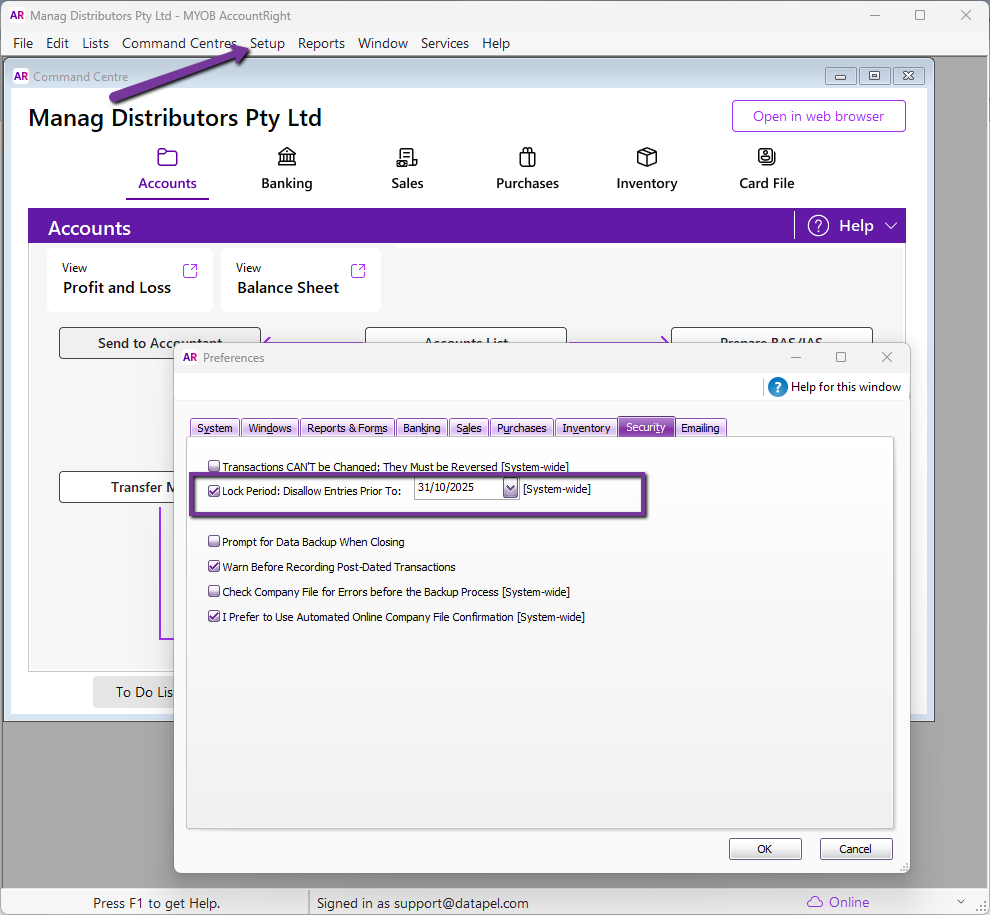
To allow the WMS transactions through, you have two choices:
Option A: Uncheck the box entirely to temporarily disable the lock.
Option B: Change the date to an earlier period that encompasses the transactions you are trying to import.
[!IMPORTANT] Take note of the original date and settings before changing them so you can restore your security preferences once the import is complete.
Step 3: Re-send Transactions from Datapel WMS
Return to your Datapel WMS.
Initiate the export/synchronization process for the failed transactions again.
Verify the Import Log to ensure the error 4222 is no longer appearing.
Step 4: Restore MYOB Security Settings
Once the import is successful, return to MYOB > Setup > Preferences > Security.
Re-enable the Lock Period and set the date back to your preferred financial closing date to ensure data integrity.
Related Information
Troubleshooting Replication Incomplete and MYOB Connection Errors
Was this article helpful?
That’s Great!
Thank you for your feedback
Sorry! We couldn't be helpful
Thank you for your feedback
Feedback sent
We appreciate your effort and will try to fix the article