Introduction
In Datapel WMS, your Shipping Methods act as the link between your warehouse dispatch and your customer’s expectations. This guide will show you how to maintain your shipping list, including adding new carriers, renaming existing methods, and deactivating those you no longer use.
Instructions to Manage Shipping Methods
Setting up your shipping methods correctly ensures that sales orders flow seamlessly from your accounting software through to your packing bench.
Step 1: Access the Manage Lists Menu
Step 2: Locate Shipping Methods
Step 3: Add, Rename, or Inactivate Methods
Step 1: Access the Manage Lists Menu
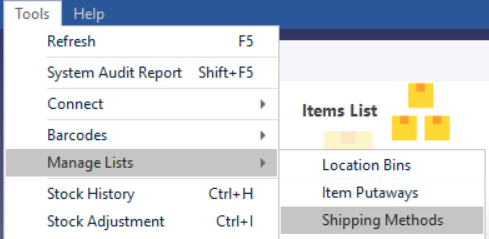
Log into your Datapel WMS desktop client. From the top navigation bar, click on Tools and then select Manage Lists from the dropdown menu.
Step 2: Locate Shipping Methods
Within the Manage Lists window, find and select Shipping Methods from the list of available categories. This will open the dedicated Manage Shipping Methods screen.
Step 3: Add, Rename, or Inactivate Methods
Perform the following actions based on your needs:
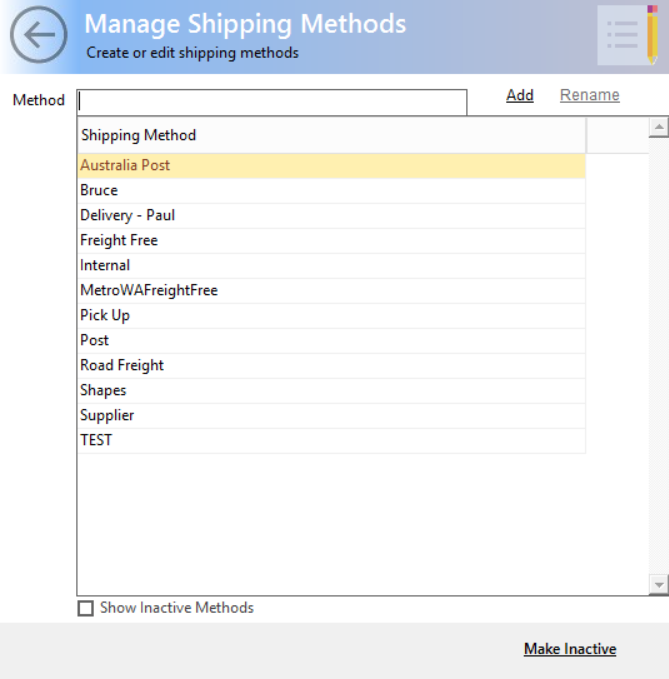
To Add a New Method: Type the name of the new shipping carrier or service in the text field and click Add.
To Rename a Method: Find the method in the list, double-click it to activate the edit mode, type the new name, and click Rename.
To Deactivate a Method: Select the shipping method (double-click), then click Make Inactive.
Related Information
How to Invoice and Close Sales Orders
Was this article helpful?
That’s Great!
Thank you for your feedback
Sorry! We couldn't be helpful
Thank you for your feedback
Feedback sent
We appreciate your effort and will try to fix the article