Summary
Purpose:
To provide step-by-step guidance for safely releasing and cancelling a Work Order that has been created incorrectly and is stuck in PART PICKED or NSA status.
Steps to Release and Cancel Work Order
Open the Work Order
Navigate to Work Orders in Datapel.
Open the specific Work Order (e.g., 0149-8721).
Access Pick WorkOrders
Go to the Pick WorkOrders section to view all pick lines.
Release Picked Lines
For each picked line:
Use Release Workorder for each item individually
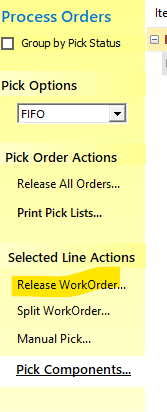
Confirm Work Order Status
Verify that the Work Order status has been updated to RTP (Ready to Process).
This confirms all picks have been successfully released.
Cancel or Correct Work Order
Once status is RTP, you may:
Cancel the Work Order, or
Correct the Work Order details and reprocess as needed.
Notes and Considerations
Work Orders in PART PICKED or NSA status cannot normally be cancelled without releasing picked lines first.
If the Work Order is stuck and cannot be released via the standard interface:
Senior or Dev intervention may be required to manually change the status from the backend for support to change the status in WMS from Part-Pick to NSA and then to cancel
Was this article helpful?
That’s Great!
Thank you for your feedback
Sorry! We couldn't be helpful
Thank you for your feedback
Feedback sent
We appreciate your effort and will try to fix the article