Introduction to Replication
Replication is the essential process of synchronizing your Datapel WMS workspace with your accounting company file (such as MYOB).
Think of it as a "data bridge." During replication, the WMS scans your accounting file for updates—such as new customers, updated stock items, or new warehouse locations—and pulls that information into the WMS. To ensure your warehouse team is working with the most accurate data, replication should be performed at least once or twice daily, or immediately after making significant changes in your accounting software.
Replication Modes: Detailed vs. Express
Depending on your needs, you can choose between two primary synchronization methods:
| Mode | Function | Best Used For... |
| Express Mode | Scans for changes made in the last 24 hours only. | Daily morning routine or quick mid-day updates. |
| Detailed Mode | A comprehensive "Maintenance" scan of ALL records for any changes or new entries. | Weekly maintenance or after fixing specific data errors (like the "Item Cannot be Sold" error). |
How to Run a Manual Replication
Follow these steps to trigger a manual sync between WMS and your accounting software:
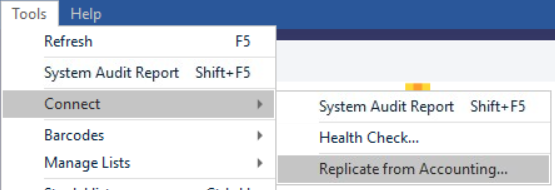
In the Datapel WMS, navigate to the Tools menu.
Select Connect > Replicate from Accounting.
Choose your preferred mode: Detailed or Express.
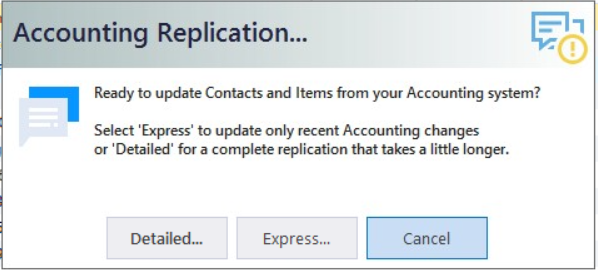
Wait for the progress bar to complete. The time taken will depend on the mode selected and the size of your database.
Targeted Synchronization (Single Item/Contact)
If you only need to update a single record and don't want to run a full system replication, you can use these shortcuts:
For a Single Contact: Go to Tools > Find Contacts > Search for the card > Click "Replicate Card."
For a Single Item: Open the Item List Register > Double-click the item to open Inventory Detail > Click "Synchronize Item."
Post-Replication Review
After the process finishes, it is best practice to verify that the data transferred correctly without errors.
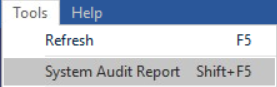
Go to Tools > System Audit Report.
Review any Alerts or error logs to ensure all records were successfully indexed.
Pro Tip: If you just want to update the view of your current screen without pulling new data from your accounting software, simply use Tools > Refresh. This is faster but does not perform a replication.
Related Information
Tools > Refresh (Refresh WMS database but not performing any replication)
Gateway Timeout - Error Code 800002 & 37003
Set-up Overnight Replication
Was this article helpful?
That’s Great!
Thank you for your feedback
Sorry! We couldn't be helpful
Thank you for your feedback
Feedback sent
We appreciate your effort and will try to fix the article